Best Laptops for Students in India Under ₹50,000
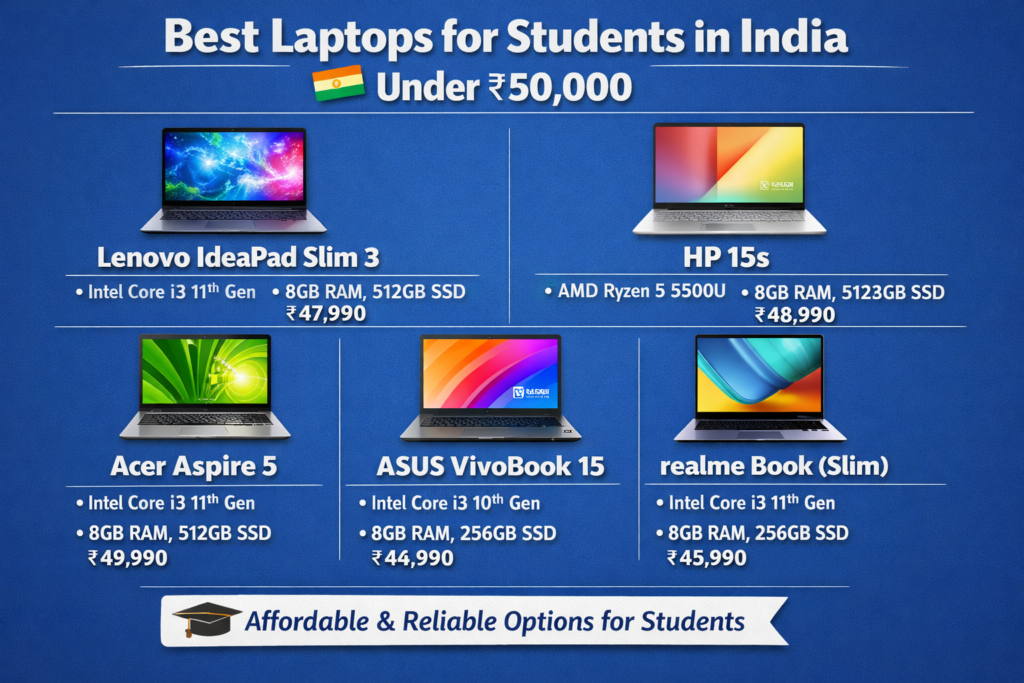
1. Lenovo IdeaPad Slim 3
- Why it’s good: Excellent balance of performance and portability
- Processor: Intel Core i3 / Ryzen 3 options
- RAM & Storage: 8GB RAM, 256GB / 512GB SSD (varies by model)
- Good for: Students, multitasking, MS Office, browsing, online classes
- Why pick it: Lightweight design and fast SSD make everyday tasks smooth
2. HP 15s
- Why it’s good: Reliable everyday laptop from a trusted brand
- Processor: Intel Core i3 / Ryzen 3
- RAM & Storage: 8GB RAM + SSD (fast boot & app loading)
- Good for: Document work, research, video lectures
- Why pick it: Comfortable keyboard and good battery life
3. Lenovo V14 / V15 (Business Series)
- Why it’s good: Budget-friendly and durable
- Processor: Intel or AMD (based on configuration)
- RAM & Storage: 8GB RAM + SSD
- Good for: Study notes, presentations, Zoom/Teams
- Why pick it: Simple build, long-lasting daily reliability
4. Dell Inspiron 15 3000 Series
- Why it’s good: Solid all-rounder with dependable support
- Processor: Intel Core i3
- RAM & Storage: 8GB RAM, SSD
- Good for: Students needing reliable performance
- Why pick it: Brand reliability and good after-sales service
5. Acer Aspire 3
- Why it’s good: Value-for-money laptop with decent specs
- Processor: Intel Core / Ryzen (varies by SKU)
- RAM & Storage: 8GB RAM, SSD
- Good for: Browsing, light productivity, online classes
- Why pick it: Good display quality for the price
6. ASUS VivoBook 15
- Why it’s good: Stylish and student-friendly design
- Processor: Intel Core / AMD Ryzen
- RAM & Storage: 8GB RAM, SSD
- Good for: Students who want both performance and looks
- Why pick it: Great keyboard and overall solid feature set
Choosing the Right Student Laptop Under ₹50,000
When picking a laptop for students, prioritize these features:
1. Processor
- Intel Core i3 or AMD Ryzen 3/5 — good for everyday use
- Helps with fast processing for assignments, browsing, and videos
2. RAM
- 8GB RAM minimum — smooth multitasking
- Helps when using multiple tabs, apps, and video calls
3. Storage
- SSD (256GB or 512GB) — much faster than HDD
- Faster boot times and quicker access to files
4. Battery Lifewwww
- At least 6–8 hours — good for classes and study sessions
- Students often sit in libraries or classrooms without frequent charging
5. Display & Build
- 15.6″ screen — comfortable for typing and research
- A sturdy build ensures longer life (important for students)
Example Recommendations (with typical specs)
| Laptop Model | Processor | RAM | Storage | Best For |
|---|---|---|---|---|
| Lenovo IdeaPad Slim 3 | Intel Core i3 | 8GB | 256GB SSD | Everyday student use |
| HP 15s | Ryzen 3 | 8GB | 512GB SSD | Fast storage + reliable performance |
| Dell Inspiron 15 | Intel Core i3 | 8GB | 256GB SSD | Brand support + durability |
| Acer Aspire 3 | Ryzen 3 | 8GB | 256GB SSD | Great value choice |
| ASUS VivoBook 15 | Intel Core / Ryzen | 8GB | 512GB SSD | Stylish + good performance |
| Lenovo V14 / V15 | Intel/AMD | 8GB | 512GB SSD | Budget business laptop –>w |
Final Tips for Students
SSD is worth it — speeds up everything
8GB RAM minimum — smoother usage for Zoom and multitasking
Windows 11 — modern interface and better updates
Good warranty — helps reduce repair costs later